




ClipZap.AI
An all-in-one AI content creation platform that connects 40+ video, image, and audio models into a single workflow.



What is ClipZap.AI?
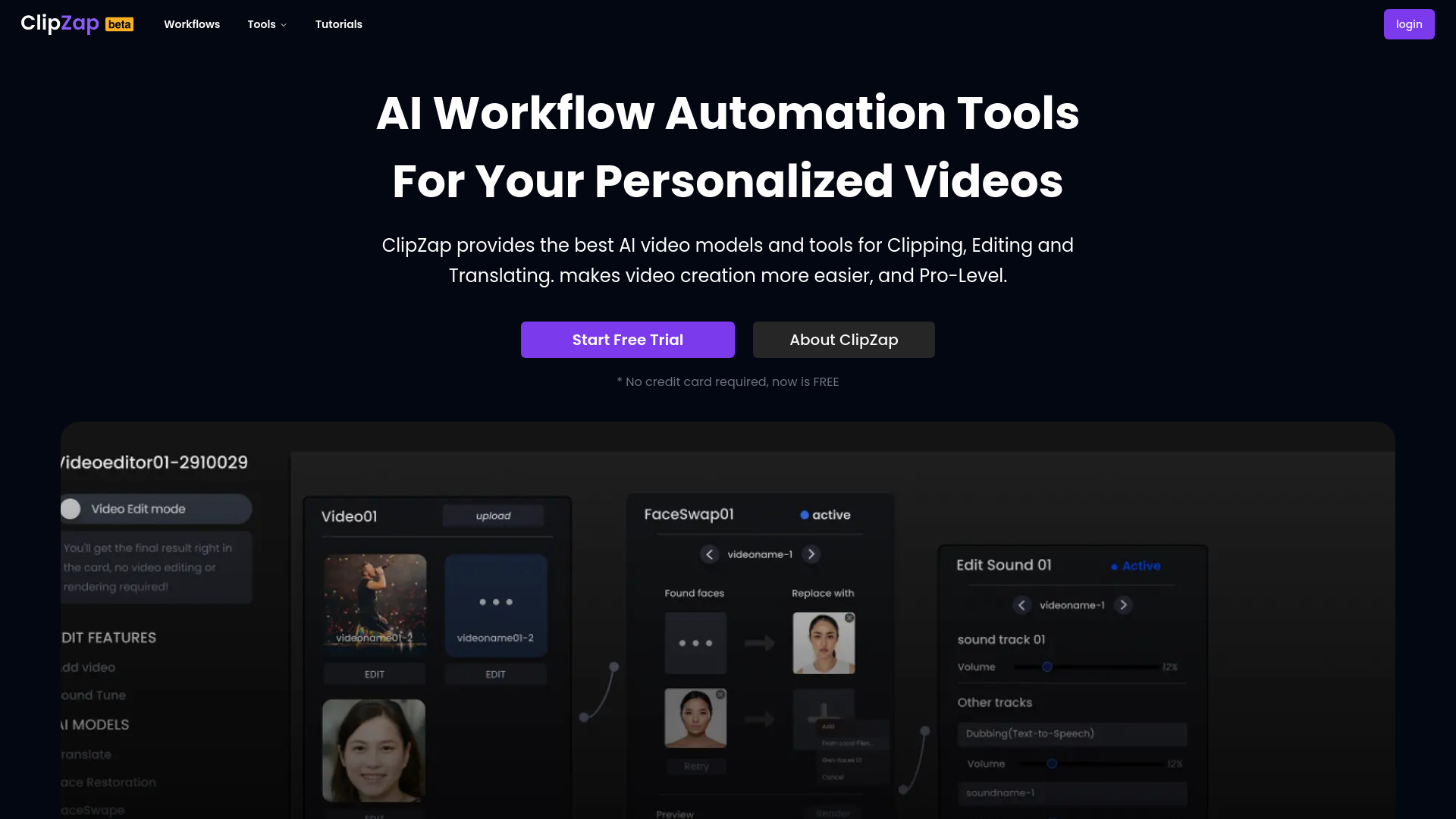
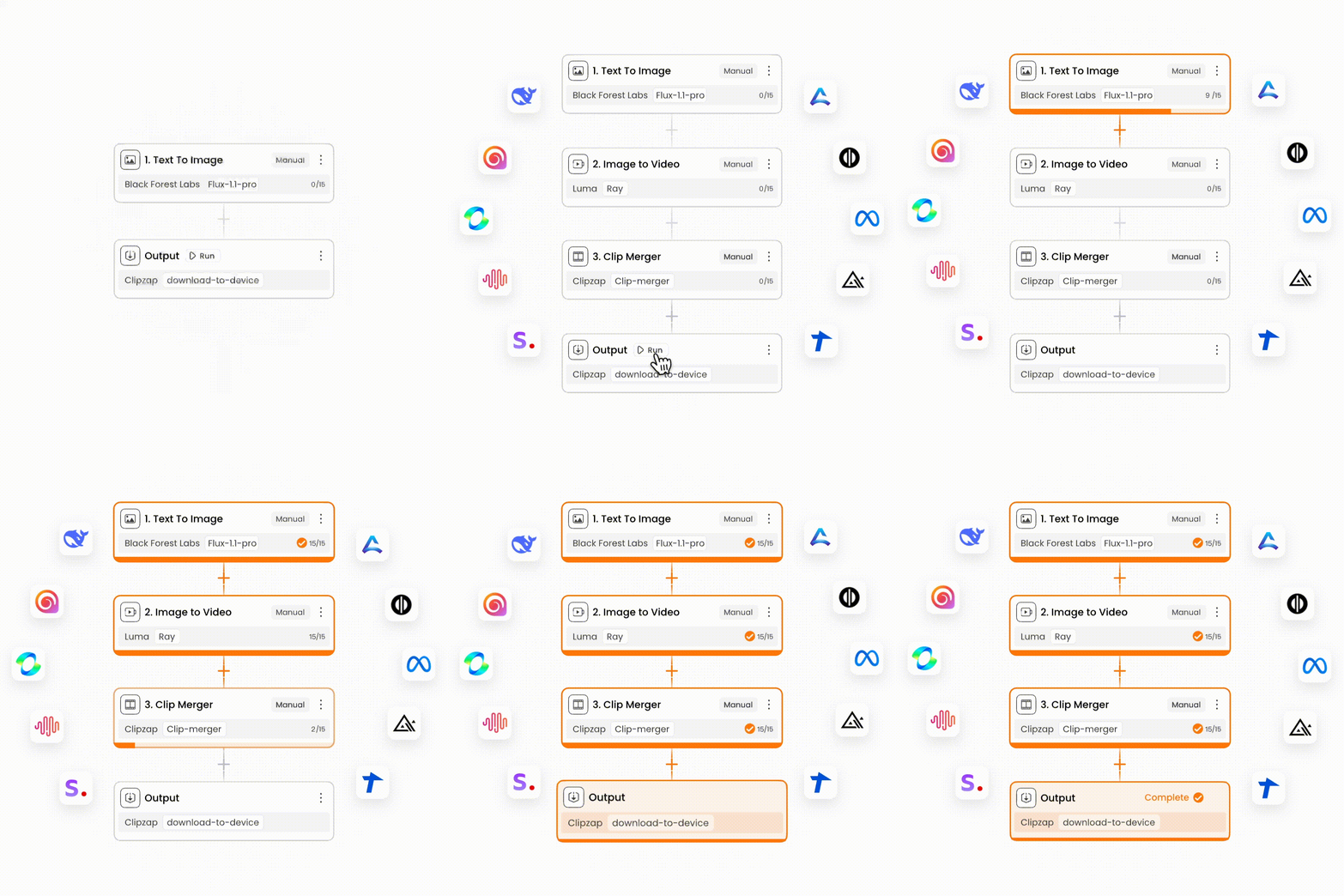
ClipZap.AI is an all-in-one AIGC professional platform that brings multiple AI video, image, and audio models together in a single web-based workspace. Instead of jumping between separate AI tools, creators can connect the world's leading video models and apps through one visual workflow editor and manage their entire content production process from a single dashboard. With 40+ integrations and 60+ templates, the platform is designed to make professional-grade AI content creation fast, repeatable, and accessible. The core of ClipZap.AI is its workflow editor, which lets users create text, image, audio, and video production pipelines in seconds. It also includes dedicated AI generators for creative videos, viral effects, and social media art. Users can generate videos from text prompts or existing images, customize style, motion, and length, and use AI effects to create attention-grabbing content. The platform is especially suited for auto content generation, helping part-time creators and personal branding studios maintain consistent output without sacrificing quality. ClipZap.AI is built for content creators, marketers, and businesses that need fast, commercial-ready visual content. The platform reports 400,000+ AI content creators and a 4.9/5 rating from 2k+ customers. Basic services are free, while complex models, the workflow editor, and faster generation speeds are available through paid subscription tiers. Generated resources can be used commercially as long as users follow ClipZap's usage guidelines and terms of service.
SpecificationsAI-estimated
Key Features of ClipZap.AI
Use Cases for ClipZap.AI
Text-to-video content creation
Describe a scene or idea and generate a high-quality video clip without filming.
Image-to-video animation
Upload AI-generated art or gallery photos and turn them into motion videos.
Viral social media effects
Apply AI visual effects to create attention-grabbing, shareable videos.
Automated content workflows
Use the editor to set up repeatable pipelines that produce consistent batches of posts and videos.
AI-assisted social post creation
Generate witty captions and matching visuals in one platform.
Marketing and ad video production
Produce commercial-ready videos for ads, YouTube, social media, and websites.
Personal branding consistency
Maintain steady, on-brand output using saved templates and workflows.
How to use ClipZap.AI?
Choose a template
Browse the 60+ ClipZap templates created by officials and UGC creators to find a starting point for your content pipeline.
Customize your workflow
Use the visual workflow editor to connect text, image, audio, and video AI models and integrations into a repeatable production process.
Generate your content
Enter a text prompt or upload an image, then choose the style, motion, and length for video generation or apply AI effects and art generation.
Review and export
Preview the generated video, image, or post, refine it as needed, and then export or publish your content for social media, ads, or commercial projects.
Pros & Cons of ClipZap.AI
Pros
- All-in-one AIGC platform that connects 40+ AI video, image, and audio tools.
- Visual workflow editor enables automated, consistent content production without coding.
- 60+ ready-made templates speed up project creation for beginners and pros.
- AI video generator supports fast text-to-video and image-to-video creation.
- Commercial use of generated resources is permitted with the platform's usage guidelines.
Cons
- The fully free tier is limited to basic models; advanced AI models, the workflow editor, and premium generation require payment.
- Faster generation speeds are locked behind paid Starter and Profession subscription tiers.
- The platform's AI model catalog is still evolving, with a 50+ integration goal originally targeted for January 2025 rather than a guaranteed complete set at launch.
- As a web-based SaaS platform, no offline or desktop workflow option is mentioned on the site.
Frequently Asked Questions
What is ClipZap AI?
ClipZap.ai is an all-in-one AI video and content creation platform. It connects over 20+ top AI visual models and application templates, allowing users to access the core features of tools like Pikalabs, RunwayML, Pixverse, and more with a single click. It is designed for simple, one-stop AI model generation.
Does ClipZap work for free?
ClipZap's basic services are free. However, the platform charges for complex models, the workflow editor, and faster generation.
How can I get faster generation?
You can get faster generation by upgrading your subscription level. ClipZap offers high-speed delivery modes in 2x and 5x slots at the Starter and Profession levels. You can subscribe anytime and cancel anytime.
How many AI models does ClipZap support?
ClipZap is rapidly adding AI model integrations and expected to complete 50+ AI model integrations by January 2025, covering image, video, and audio domains.
Can ClipZap resources be used for commercial purposes?
Yes, you can use ClipZap resources for commercial purposes as long as you follow their usage guidelines and terms of service. This includes using AI-generated content for ads, YouTube, social media, websites, and more, while avoiding copyright violations or misleading use.
What types of content can I create with ClipZap?
Using the workflow editor, you can create text, image, audio, and video production workflows. You can also generate videos from text or images, create AI effects for viral videos, and generate captions and visuals for social media posts.
What integrations and templates does ClipZap offer?
ClipZap offers 40+ AI integrations and 60+ templates. The templates are contributed by ClipZap officials and UGC creators, so you don't have to start from scratch.
Reviews & Ratings0.0
No reviews yet. Be the first to write one!
Top Alternatives & Similar Software
View all alternatives & similar software→




People also viewed



Related searches
Is this your tool?
Claim this page to update details, reply to user reviews, and drive more traffic to your product.
Claim this Product →
Explore Related Topics
Keep up with ClipZap.AI alternatives
New alternatives, pricing changes and the week's biggest movers - one email every Tuesday.