



Core Temp vs SpeedFan
Side-by-side comparison of features, pricing, ratings, and alternatives.
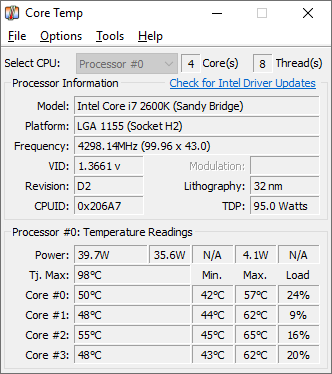
Core Temp is a compact monitoring utility focused on displaying real-time temperature readings for each individual processor core. It supports Intel, AMD, and VIA x86 processors and is designed to be motherboard-agnostic.
SpeedFan is a classic hardware monitoring utility designed for Microsoft Windows that interfaces with digital temperature sensors, voltage inputs, and fan controllers. It reads data from motherboards connected via the SMBus to give users detailed insights into their system's thermal performance. Beyond basic monitoring, SpeedFan allows advanced users to manually or automatically adjust fan speeds based on component temperatures to reduce noise and prevent overheating. Although development has largely stalled for modern hardware, it remains a recognized tool for legacy systems and custom fan curves.
- Very lightweight and focused specifically on accurate core temperature readings
- Free to use with no paid tier required
- Motherboard-agnostic, so it works across a wide range of systems
- Plugin platform allows extending functionality
- Completely free to download and use without restrictions.
- Provides deep, low-level access to motherboard sensors and voltages.
- Allows highly customizable fan speed control profiles.
- Lightweight system footprint with minimal resource usage.
- Windows-only, with no native Mac or Linux support
- Interface and feature set are narrower than full multi-sensor tools like HWMonitor
- Installer has historically bundled optional third-party offers, so users should watch installation steps carefully
- Outdated user interface that lacks modern visual polish.
- May not support newer motherboards, chipsets, or modern hardware configurations.
- Requires careful setup to avoid accidentally turning off crucial cooling fans.
More alternatives & similar tools
Alternatives to Core Temp
View all →

Alternatives to SpeedFan
View all →The Verdict
AI-generated from listing dataSpeedFan offers broader hardware monitoring and fan control but feels dated; Core Temp is a slimmer, more focused CPU temperature tool.
Key differences
- •SpeedFan monitors temperatures, voltages, fan speeds, and SMART data; Core Temp only shows per‑core CPU temps.
- •SpeedFan lets you create custom fan speed thresholds; Core Temp has no fan control.
- •Core Temp’s plugin platform adds extensibility; SpeedFan has no plugin or API support.
- •SpeedFan may not support newer motherboards; Core Temp is motherboard‑agnostic for supported CPUs.
Pricing & value
Both are free with no paid tiers, offering comparable cost‑benefit.
Ease of use / learning curve
Core Temp’s narrow focus and lightweight UI are simpler than SpeedFan’s more complex configuration.
Features & depth
SpeedFan provides multi‑sensor monitoring, fan control, voltage checks, and SMART data, far beyond Core Temp’s CPU temps.
Integrations & ecosystem
Core Temp supports a plugin platform and mobile companion apps; SpeedFan has no API or plugins.
Support
SpeedFan lists community forums and documentation; Core Temp provides no explicit support options.
Choose Core Temp if…
Users who only need accurate per‑core CPU temps and prefer a minimal, easy‑to‑use tool.
Choose SpeedFan if…
Enthusiasts needing full system monitoring and fan control on Windows desktops.
Common questions
Do either of these tools cost anything?
Both are free to download and use with no paid tiers.
Can I control fan speeds with Core Temp?
No, Core Temp does not provide fan control; SpeedFan does.
Will they work on my newer motherboard?
SpeedFan may lack support for newer boards; Core Temp is motherboard‑agnostic for supported Intel, AMD, and VIA CPUs.