



Core Temp vs CPU-Z
Side-by-side comparison of features, pricing, ratings, and alternatives.
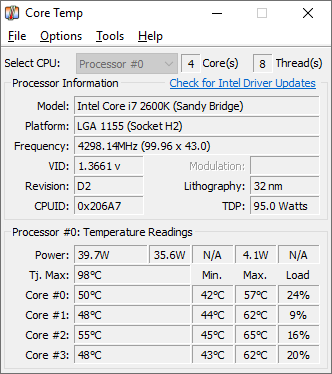

Core Temp is a compact monitoring utility focused on displaying real-time temperature readings for each individual processor core. It supports Intel, AMD, and VIA x86 processors and is designed to be motherboard-agnostic.
CPU-Z is a lightweight diagnostic utility that gathers information on some of the main devices of your system. It provides detailed technical specifications regarding your processor, motherboard, memory, and system core components in a straightforward interface. Widely used by hardware enthusiasts, overclockers, and system builders, the software allows users to monitor real-time internal frequencies, cache sizes, and voltage levels. It also includes a built-in benchmarking tool to test and compare processor performance against industry standards.
- Very lightweight and focused specifically on accurate core temperature readings
- Free to use with no paid tier required
- Motherboard-agnostic, so it works across a wide range of systems
- Plugin platform allows extending functionality
- Completely free to download and use without hidden paywalls
- Extremely lightweight with minimal system resource consumption
- Provides deeply detailed and accurate hardware identification
- Includes built-in CPU performance benchmarking and validation tools
- Windows-only, with no native Mac or Linux support
- Interface and feature set are narrower than full multi-sensor tools like HWMonitor
- Installer has historically bundled optional third-party offers, so users should watch installation steps carefully
- User interface looks dated and utilitarian
- Lacks advanced hardware temperature logging over long periods
- Windows version lacks a modern dark mode or customization options
More alternatives & similar tools
Alternatives to Core Temp
View all →
Alternatives to CPU-Z
View all →


The Verdict
AI-generated from listing dataCPU‑Z is the safer default for full system profiling and benchmarking, while Core Temp is the focused, lightweight choice if you only need per‑core temperature data.
Key differences
- •Scope: CPU‑Z reports CPU, motherboard, memory, and runs benchmarks; Core Temp reports only temperatures.
- •Benchmarking: CPU‑Z includes built‑in single‑ and multi‑thread CPU tests; Core Temp does not.
- •OS support: CPU‑Z runs on Windows and Android; Core Temp is Windows‑only.
- •Interface: CPU‑Z has a dated, utilitarian UI; Core Temp offers a minimal tray UI with customizable notifications.
- •Extensibility: Core Temp provides a plugin platform; CPU‑Z has no plugin or API support.
Pricing & value
Both are free with no hidden paywalls, offering comparable value for their respective feature sets.
Ease of use / learning curve
Core Temp’s single‑purpose UI is simpler for temperature monitoring than CPU‑Z’s broader, more detailed interface.
Features & depth
CPU‑Z provides extensive hardware identification, memory details, and benchmark tools beyond Core Temp’s temperature focus.
Integrations & ecosystem
Core Temp offers a plugin platform and mobile companion apps; CPU‑Z has no API or plugin support.
Support
CPU‑Z lists community forums for support; Core Temp provides no specific support channels in the facts.
Platform coverage
CPU‑Z runs on Windows and Android, whereas Core Temp is Windows‑only.
Security & privacy
Neither product mentions security or privacy features; both are free desktop apps without stated data collection.
Choose Core Temp if…
Users who only want lightweight, real‑time core temperature monitoring on Windows.
Choose CPU-Z if…
Users needing comprehensive hardware info, benchmarking, or Android support.
Common questions
Is there any cost to use either tool?
Both CPU‑Z and Core Temp are free to download and use with no paid tiers.
Can I monitor temperatures over long periods with these tools?
Core Temp provides real‑time per‑core temperature readings; CPU‑Z lacks advanced long‑term temperature logging.
Do either of these tools work on macOS or Linux?
CPU‑Z runs on Windows and Android; Core Temp is Windows‑only. Neither supports macOS or Linux.