



Any Video Converter vs VideoProc Converter AI
Side-by-side comparison of features, pricing, ratings, and alternatives.

Any Video Converter is a video and audio conversion tool with a long operating history, converting between more than 1000 formats with batch processing the vendor advertises at up to 130x real-time speed. It includes AI-powered video upscaling and quality enhancement for improving lower-resolution source footage, along with modern-codec compression to reduce file size, audio extraction to MP3/WAV, and a built-in downloader that can save video from over 1000 supported websites. The product also bundles AI creative tools (branded Seedance AI) for text-to-video generation and photo editing alongside its core conversion features. It is offered in free and paid Pro/Ultimate tiers for both Windows and macOS, aimed at general users and content creators who need broad, flexible format conversion rather than a single-purpose converter.
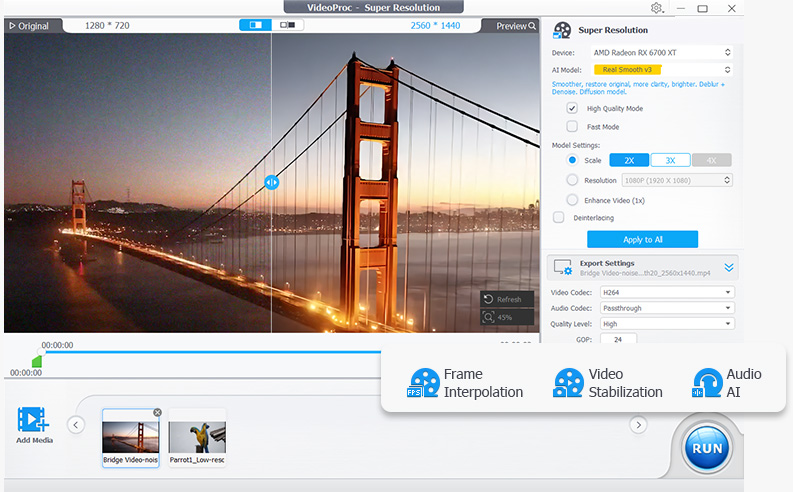
VideoProc Converter AI is an all-in-one video and image tool from Digiarty Software that combines format conversion with AI enhancement. It converts across 420+ output formats, uses AI super resolution to upscale low-resolution video up to 4K and images up to 8K, and applies frame interpolation, stabilization, and noise reduction to raw footage. The software also compresses files by more than 90 percent, includes screen and webcam recording, and downloads video from over 1,000 sites. Processing is accelerated through Level-3 hardware acceleration across NVIDIA, AMD, Intel, and Apple Silicon GPUs, aiming to make demanding AI tasks run at practical speeds on consumer hardware.
- Extremely broad format support covers nearly any video or audio conversion need in one app.
- Long operating history suggests active, ongoing maintenance and format updates.
- Free tier handles basic conversion tasks without requiring immediate payment.
- Built-in downloader and AI upscaling add value beyond plain format conversion.
- Very broad format support for input and output
- GPU acceleration makes conversion significantly faster
- AI upscaling and stabilization go beyond basic conversion
- Lifetime license option avoids ongoing subscription cost
- Historically bundled optional third-party offers during installation, so the installer needs careful attention to avoid extra software.
- Pro/Ultimate pricing isn't clearly listed on the main site and requires visiting a separate purchase flow.
- Interface is more utilitarian than modern, minimal converter tools.
- Free trial is limited by file size and duration restrictions
- Interface bundles many tools which can feel overwhelming for simple conversions
- AI enhancement features require capable GPU hardware for best speed
More alternatives & similar tools
Alternatives to Any Video Converter
View all →
Alternatives to VideoProc Converter AI
View all →Long-running video conversion tool supporting 1000+ formats with AI upscaling and compression.
The Verdict
AI-generated from listing dataVideoProc Converter AI offers a one‑time paid, GPU‑accelerated suite with AI upscaling and stabilization, while Any Video Converter provides a freemium model with broader format count but less emphasis on hardware acceleration.
Key differences
- •VideoProc requires a one‑time purchase; Any Video Converter has a free tier and paid upgrades
- •VideoProc emphasizes GPU‑Level‑3 acceleration and AI frame interpolation; Any Video Converter mentions AI upscaling but no hardware acceleration claim
- •VideoProc includes built‑in screen/webcam recorder and downloader for 1,000+ sites; Any Video Converter also has a downloader but no recording tools
- •VideoProc’s free trial limits file size/duration; Any Video Converter’s free tier imposes no explicit trial limits but may show ads
- •VideoProc lists 420+ formats; Any Video Converter claims support for over 1,000 formats
Pricing & value
Any Video Converter offers a free tier; VideoProc requires a paid one‑time license.
Ease of use / learning curve
Any Video Converter’s interface described as utilitarian but simpler; VideoProc bundles many tools, which can feel overwhelming.
Features & depth
VideoProc provides GPU acceleration, AI frame interpolation up to 480 fps, stabilization, and recording; Any Video Converter lacks these specifics.
Integrations & ecosystem
Both are desktop apps with no open‑source or API; neither offers integrations, so tie not appropriate—Any Video Converter’s broader format list gives slight edge.
Scalability
VideoProc’s Level‑3 hardware acceleration and AI processing scale with capable GPUs; Any Video Converter does not mention such scaling.
Support
Neither product’s support details are provided in the facts.
Security & privacy
No information on security, privacy, or data handling is given for either.
Choose Any Video Converter if…
Users who want a free or low‑cost tool with the widest possible format support and basic AI upscaling.
Choose VideoProc Converter AI if…
Content creators needing fast GPU‑accelerated upscaling, stabilization, and recording, willing to pay once.
Common questions
Is there a free version available?
Any Video Converter offers a freemium tier; VideoProc Converter AI only provides a paid one‑time license with a limited trial.
Does either tool use GPU acceleration?
VideoProc Converter AI explicitly uses Level‑3 hardware acceleration on NVIDIA, AMD, and Intel GPUs; Any Video Converter does not mention GPU acceleration.
How many formats does each support?
VideoProc lists support for 420+ formats; Any Video Converter claims support for over 1,000 video and audio formats.