



Voice Isolator
AI-powered background noise removal and vocal isolation for cleaner, professional audio in seconds.


What is Voice Isolator?
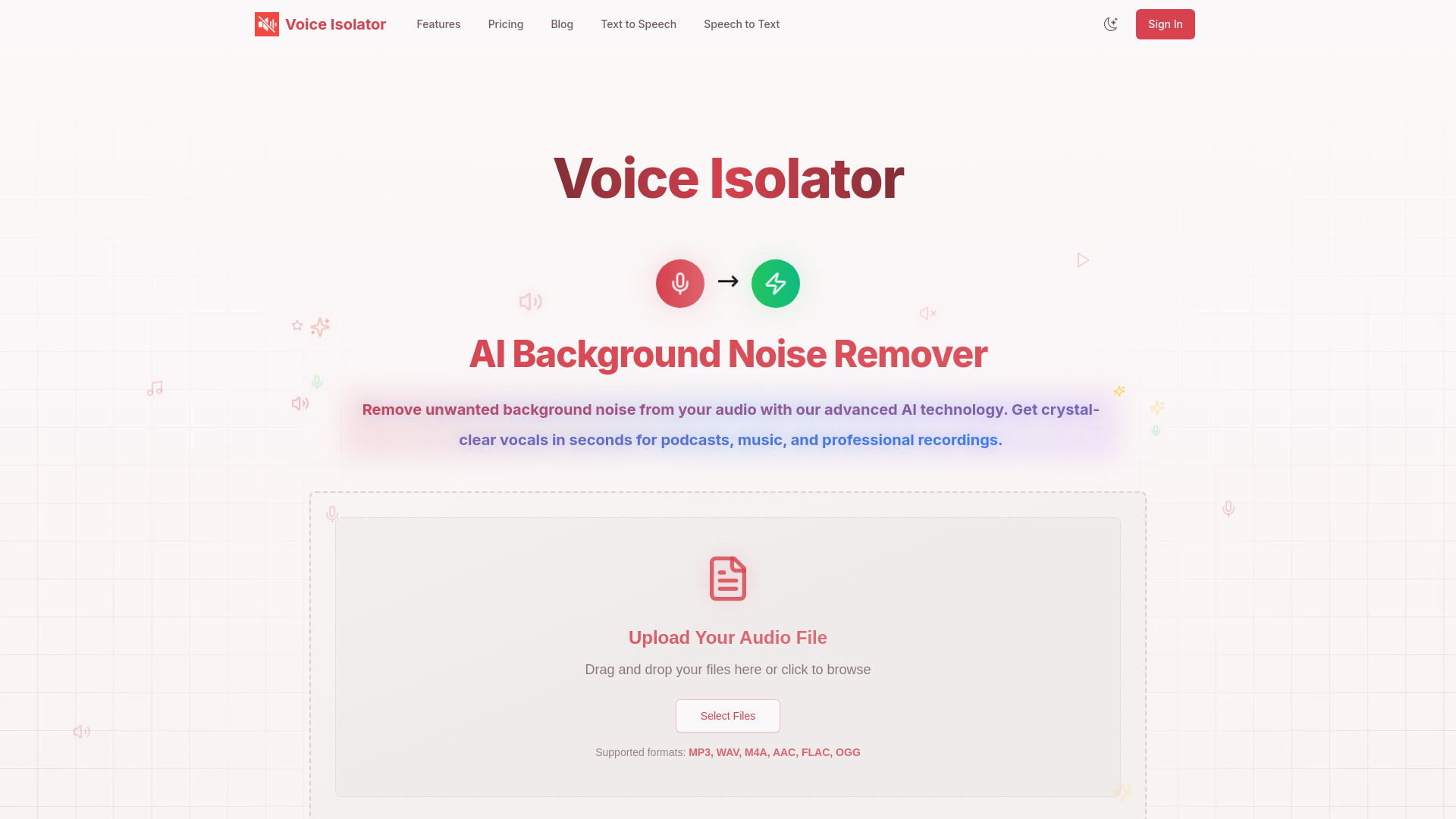
Voice Isolator is an AI-powered web application that removes background noise and isolates vocals from audio files. Instead of manually editing waveforms or applying traditional filters, the service uses deep-learning algorithms to identify the human voice and separate it from music, ambient sound, and other unwanted noise in one pass. Users upload an audio file, wait a few seconds for cloud processing, and download clean vocal or instrumental results for further editing or publishing. The workflow is intentionally minimal: drag and drop or browse to choose an MP3, WAV, M4A, AAC, FLAC, or OGG file, and the platform's AI processing engine handles the rest. The site reports support for high-resolution audio up to 192 kHz and says most vocal isolation tasks finish in seconds. A real-time preview lets users check the cleaned audio before exporting. Access is credit-based—each second of audio consumes one credit—and new users who sign in receive 60 free credits. Paid plans provide 500 to 6,000 credits per billing cycle. Voice Isolator is aimed at podcasters, music producers, content creators, audio engineers, broadcasters, and even karaoke operators who need fast, professional-sounding vocal separation. It positions itself as a privacy-conscious service: audio files are encrypted during transmission and processing and automatically deleted afterward. With more than 2.5 million audio files processed and over 500 million minutes of background noise removed, the tool is designed for users who want broadcast-ready audio without investing in complex desktop software.
SpecificationsAI-estimated
Key Features of Voice Isolator
Use Cases for Voice Isolator
Podcast Production
Remove room tone, air-conditioner hum, and other ambient noise from interview recordings to produce cleaner episodes.
Music Production
Extract clean vocals from mixed tracks or live recordings for sampling, remixing, or post-production.
Karaoke and Backing Tracks
Remove original vocals to create instrumental versions of popular songs for karaoke businesses or personal use.
YouTube and Social Video
Clean up audio recorded in noisy environments such as traffic, cafes, or offices so videos sound professional.
Radio and Broadcasting
Prepare field reports, phone interviews, and remote segments by stripping out background noise before airing.
Audio Restoration
Salvage older or live recordings by isolating vocals while reducing harsh ambient noise and crowd sounds.
How to use Voice Isolator?
Sign in and claim credits
Create an account or sign in to receive 60 free credits; each second of audio processing uses one credit.
Upload your audio
Drag and drop a file onto the page or click to browse; supported formats include MP3, WAV, M4A, AAC, FLAC, and OGG.
Run AI processing
Start the background noise removal/vocal isolation process and let the AI engine separate vocals from unwanted sounds.
Preview the result
Use the real-time preview to compare the original and processed versions and check vocal clarity.
Download the clean audio
Save the isolated vocal or instrumental track and use it in your project.
Pros & Cons of Voice Isolator
Pros
- Uses deep learning to separate vocals from music and ambient noise while preserving voice tone
- Supports multiple formats and high-resolution files up to 192kHz
- Processes most files within seconds and offers real-time preview of results
- Privacy-focused: encrypted transfers and automatic deletion of processed files
- Offers free trial credits and commercial licensing on paid plans
Cons
- Only 60 free credits are provided after sign-in, so longer testing requires a paid plan.
- Credit consumption of 1 credit per second can make lengthy audio projects costly.
- Requires uploading files to the cloud; no offline or desktop processing option is mentioned.
- No batch upload or bulk processing workflow is highlighted on the page.
Frequently Asked Questions
What makes Voice Isolator unique?
Voice Isolator stands out with its deep-learning AI approach. Instead of conventional filters, it identifies and isolates vocals while preserving natural voice characteristics and completely removing background noise.
Can the Voice Isolator handle different types of background noise?
Yes. It can handle music, traffic sounds, crowd noise, echo, wind, air conditioning, and environmental sounds while maintaining consistent vocal isolation quality.
How quickly does the Voice Isolator process audio files?
Most vocal isolation tasks are completed within seconds, even for longer audio files. The platform also advertises vocal isolation in about 5 seconds thanks to its enterprise-grade infrastructure.
What audio formats does the Voice Isolator support?
Supported formats include MP3, WAV, M4A, AAC, FLAC, and OGG. The service can process high-quality audio files up to a 192kHz sample rate while maintaining original fidelity.
Is my audio data secure when using the Voice Isolator?
Yes. Audio files are encrypted during transmission and processing, are not stored permanently, and are automatically deleted after processing to keep your content private.
Can I use the Voice Isolator for commercial projects?
Yes. The service is fully licensed for commercial use across all subscription tiers, including music production, podcast editing, and professional audio post-production, with royalty-free results.
Can I use the Voice Isolator for personal projects?
Absolutely. It is also suitable for personal projects such as home recordings, social media content, personal podcasts, and music hobby projects.
Is the Voice Isolator free to use?
Yes, after registering you receive 60 free credits. For advanced features and additional processing power, you can choose one of the paid plans.
Reviews & Ratings0.0
No reviews yet. Be the first to write one!
Top Alternatives & Similar Software
View all alternatives & similar software→


People also viewed



Related searches
Is this your tool?
Claim this page to update details, reply to user reviews, and drive more traffic to your product.
Claim this Product →
Tags
Explore Related Topics
Keep up with Voice Isolator alternatives
New alternatives, pricing changes and the week's biggest movers - one email every Tuesday.