




SunoPrompt
An all-in-one AI music toolkit for generating songs, splitting stems, and composing from text, images, video, or audio.
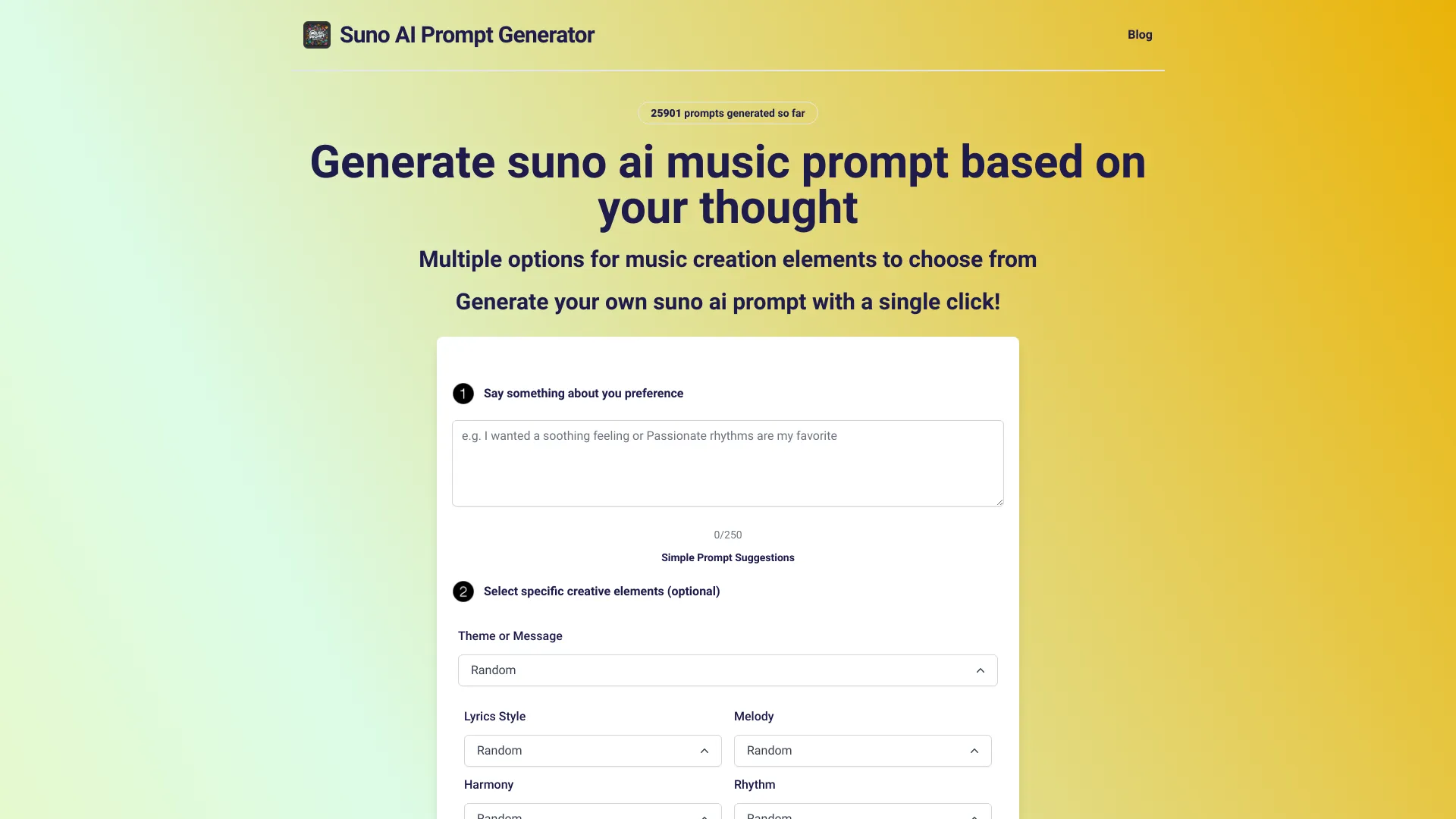

What is SunoPrompt?
SunoPrompt is an all-in-one AI music platform that combines prompt generation, song creation, vocal stem separation, and multimodal music composition in a single connected workflow. Instead of jumping between separate services, creators can move from an idea to a finished track in one place: build a detailed prompt, generate a song, split the stems, and export MIDI for further editing in a DAW. At its core, the platform offers four live tools. The AI Prompt Generator crafts optimized prompts for Suno, Udio, and other music platforms using Gemini 2.5 Flash, Gemini 2.0, or GPT-4o Mini, with 12 creative element controls covering melody, harmony, rhythm, mood, and more. The AI Music Generator creates complete songs from text descriptions or lyrics, with four quality tiers, voice gender selection, instrumental toggle, and genre tagging. The AI Vocal Remover and Stem Splitter accepts MP3, WAV, or FLAC files and can separate up to 8 stems in Advanced mode while also exporting MIDI. The AI Music Agent goes further by accepting text, images, video, or audio as creative input and composing music that matches the visual mood, audio characteristics, or text cues. SunoPrompt is free to start: the prompt generator is completely free, and the music generator and music agent include free credits for new users. There is no mandatory subscription, and users can pay with credits as they scale or upgrade for more volume. The platform is also expanding, with upcoming tools for religious and worship music, karaoke backing tracks, personalized songs for special occasions, and AI MIDI generation. It is designed for creators, producers, and content makers who want a flexible, growing toolkit without being locked into one AI engine.
SpecificationsAI-estimated
Key Features of SunoPrompt
Use Cases for SunoPrompt
Generate song ideas from text prompts
Use the AI Prompt Generator to create optimized prompts for Suno, Udio, and other AI music platforms.
Create complete songs from lyrics
Paste up to 5,000 characters of lyrics into the AI Music Generator and produce a full track with chosen style and voice.
Split vocals from tracks
Upload MP3, WAV, or FLAC files and separate vocals, instruments, and other stems for remixes or practice.
Score videos with original music
Give the AI Music Agent a video clip and it composes music that matches the pacing and visual mood.
Compose music from images
Upload a photo or artwork and let the AI interpret the visual mood to generate a matching ambient or cinematic track.
Create personalized songs for special occasions
Describe a person, memory, or feeling to generate a unique track for birthdays, weddings, anniversaries, and holidays.
Produce karaoke backing tracks
Use the upcoming karaoke maker to remove vocals and generate clean backing tracks with pitch guides for practice or live performance.
Prepare worship or devotional music
Generate background compositions for worship services, hymns, gospel, nasheeds, Buddhist chanting, and other spiritual contexts.
Export MIDI into a DAW
Split stems in Advanced mode and export MIDI files to continue editing, arranging, or producing in a digital audio workstation.
How to use SunoPrompt?
Sign in and choose a tool
Create a SunoPrompt account and pick from the AI Prompt Generator, AI Music Generator, AI Vocal Remover, or AI Music Agent.
Generate a prompt
In the Prompt Generator, select an AI model, set creative controls, and enter a description or style to create an optimized prompt.
Create a song
In the Music Generator, enter a text description or paste lyrics, choose a quality tier, voice gender, instrumental toggle, and genre, then generate the track.
Split stems or remove vocals
Upload an MP3, WAV, or FLAC file to the Vocal Remover and choose Basic, Normal, or Advanced mode to separate stems and optionally export MIDI.
Use the Music Agent for multimodal input
Type a description, upload an image, drop in a video, or feed an audio clip to the Music Agent and let it compose matching music.
Pros & Cons of SunoPrompt
Pros
- All-in-one platform eliminates tab-switching and copy-pasting between separate music tools.
- Flexible AI model selection with Gemini and GPT models for prompts and four quality tiers for music generation.
- Unique multimodal input support including text, images, video, and audio.
- Professional stem separation with up to 8 stems plus MIDI export in Advanced mode.
- Free-to-start with no mandatory subscription and a simple credit system.
Cons
- Several advertised tools are still listed as coming soon, including religious music, karaoke backing tracks, and personalized song creation.
- Free stem separation is limited to 2 stems, while advanced 8-stem separation and MIDI export require paid usage.
- The platform appears to be web-only, with no mention of native desktop or mobile apps.
- Pricing for larger volumes and credit packages is not detailed on the main page.
Frequently Asked Questions
Is SunoPrompt free to use?
The AI Prompt Generator is completely free. The AI Music Generator and AI Music Agent include free credits for new users. There is no mandatory subscription, and you can pay with credits or upgrade for more volume.
What AI models does SunoPrompt use?
The Prompt Generator uses Gemini 2.5 Flash, Gemini 2.0, and GPT-4o Mini. The Music Generator and Music Agent use four AI music quality tiers ranging from standard to top-tier.
Can I upload images, videos, or audio to create music?
Yes. The AI Music Agent accepts text descriptions, images, video clips, and audio files as creative input. It reads visual mood, audio characteristics, and text cues to compose matching music.
What audio formats does the Vocal Remover support?
The AI Vocal Remover and Stem Splitter supports MP3, WAV, and FLAC uploads.
How many stems can I split with SunoPrompt?
The free Basic mode splits 2 stems, Normal mode splits 5 stems, and Advanced mode supports up to 8 stems plus MIDI export.
Does SunoPrompt require a subscription?
No. SunoPrompt has no mandatory subscription. It uses a credit system where you pay for what you use, and you can upgrade if you need more volume.
What upcoming tools are planned?
SunoPrompt is building a Religious & Worship Music Generator, Karaoke Backing Track Maker, Personalized Song Creator, and AI MIDI Generator to expand the platform.
Reviews & Ratings0.0
No reviews yet. Be the first to write one!
Top Alternatives & Similar Software
View all alternatives & similar software→



People also viewed


Related searches
Is this your tool?
Claim this page to update details, reply to user reviews, and drive more traffic to your product.
Claim this Product →
Tags
Explore Related Topics
Keep up with SunoPrompt alternatives
New alternatives, pricing changes and the week's biggest movers - one email every Tuesday.