




Storygenerate.io AI Story Generator
Generate creative stories with AI for free, no sign-up required.
What is Storygenerate.io AI Story Generator?
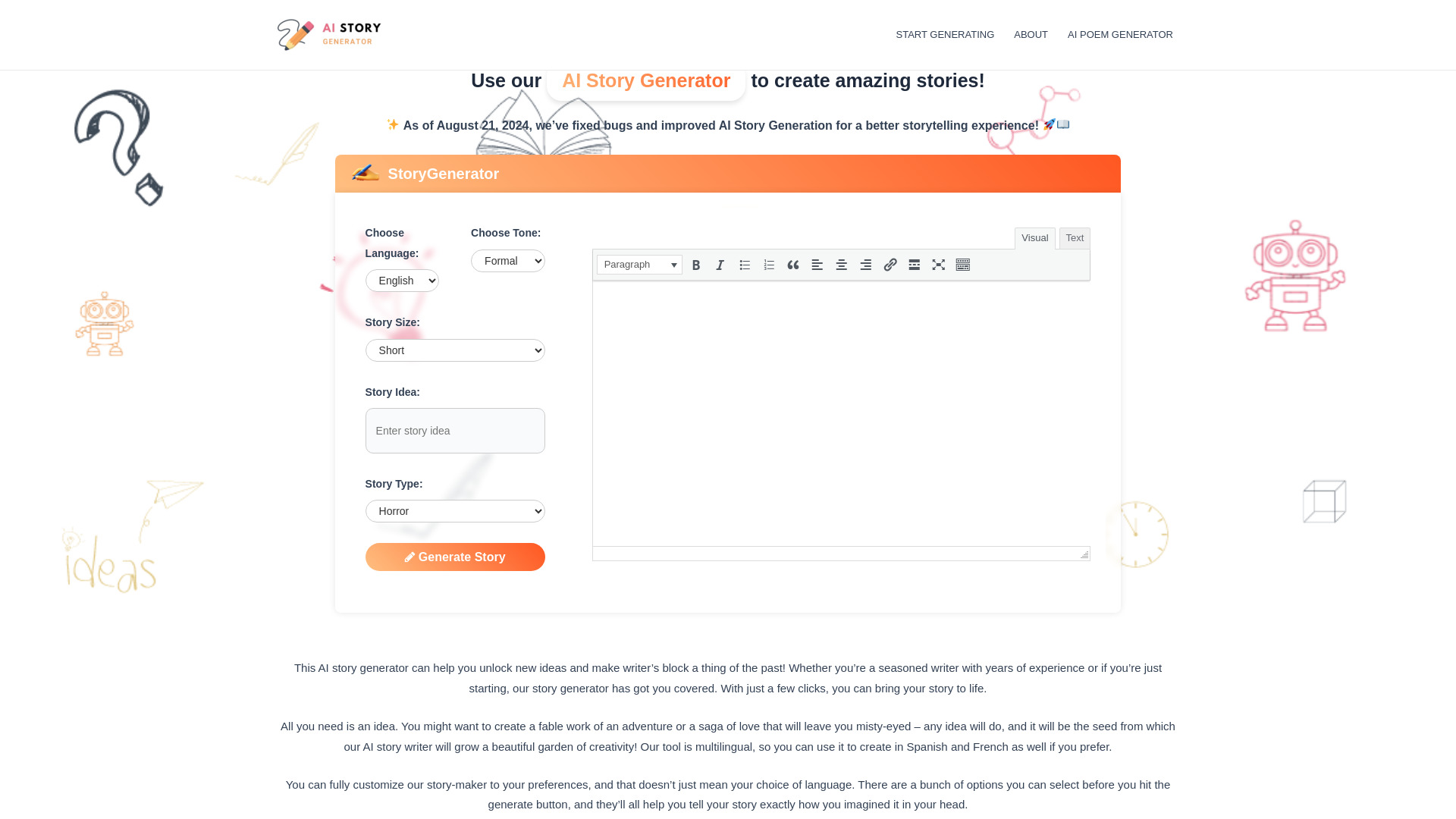
Storygenerate.io is a free, no-signup AI story generator designed to help users overcome writer's block and quickly produce creative text. The tool allows users to input a basic idea, select from fifteen different genres, choose a tone, and specify the desired length for their story. It supports twenty languages, ensuring stories can be generated in the user's preferred language rather than translated. The platform emphasizes ease of use, with the entire generation process taking about a minute. Users can refine the generated text by editing it directly, or they can use the 'Continue' button to extend the story further. All generated content is saved locally in the user's browser, and stories can be downloaded as plain text files. The service is entirely free and aims to provide a starting draft for any writing project, from fables to horror. Storygenerate.io is a valuable resource for writers of all levels, offering a spark of inspiration or a complete draft. Its flexibility in genre, tone, and language, combined with its user-friendly interface and local saving, makes it a convenient tool for generating creative narratives. The platform allows users to retain ownership of their creations, encouraging them to use the output commercially while advising awareness of copyright regulations.
SpecificationsAI-estimated
Key Features of Storygenerate.io AI Story Generator
Use Cases for Storygenerate.io AI Story Generator
Overcoming Writer's Block
Provides a starting draft or a spark of inspiration for writers struggling with the blank page.
Drafting Creative Content
Generates initial drafts for stories, novels, screenplays, or other narrative projects.
Exploring Story Ideas
Allows users to quickly test various story concepts, genres, and tones.
Language Practice
Enables users to generate stories in languages they are learning or need to write in.
Brainstorming Tool
Serves as a quick brainstorming partner for generating plot points, characters, or dialogue.
Personal Creative Outlet
Offers a fun and accessible way for anyone to experiment with storytelling.
How to use Storygenerate.io AI Story Generator?
Enter Your Idea
Input a single line or more describing your story concept. Use the 'Surprise me' button for a genre-specific prompt if needed.
Choose Story Parameters
Select a genre (e.g., mystery, fantasy), set the tone (e.g., suspenseful, funny), and pick a length (short, medium, long).
Generate the Story
Click 'Generate'. The story will appear word by word and can be read as it is written. You can also select a language and other options under 'More options'.
Edit and Refine
Once generated, click into the text to edit, change names, cut paragraphs, or press 'Continue' to extend the story in the same voice. Edits are saved automatically.
Pros & Cons of Storygenerate.io AI Story Generator
Pros
- Completely free with no sign-up or hidden costs.
- Supports 15 genres and 20 languages for diverse story creation.
- Editable output and a 'Continue' feature for iterative writing.
- Stories are saved locally in the browser, ensuring privacy and accessibility.
- Offers a 'Surprise me' option for prompt inspiration.
Cons
- AI output may not always be eligible for copyright protection.
- Stories generated are intended as a starting point or draft, not for direct submission as original work for academic purposes.
- Limited customization beyond core genre, tone, and length options in the main interface.
Frequently Asked Questions
Is this AI story generator free to use?
Yes, it is completely free to use, with no purchases or sign-ups required. You can use what it writes commercially, provided you follow the terms.
Do I have to sign up?
No, there is no login or sign-up required. Stories are saved in your browser and do not reach external servers.
How long does it take to generate a story?
The first words appear in seconds, and a short story typically finishes in under a minute. Longer stories may take slightly more time.
Can I edit the story afterwards?
Yes, you can click directly into the text to edit any part of the story. Your edits save automatically, and you can use the 'Continue' button to add more text.
What genres are available?
There are fifteen genres available: adventure, fantasy, science fiction, horror, mystery, thriller, romance, comedy, drama, historical fiction, children's stories, bedtime stories, fairy tales, flash fiction, and inspirational.
What languages does it support?
It supports twenty languages, including Spanish, French, German, Portuguese, Arabic, Hindi, Urdu, Bengali, Mandarin, Japanese, Korean, and Vietnamese. The story is written directly in the chosen language.
Who owns the story it writes?
You own the story. You can publish, sell, or adapt it. However, AI output eligibility for copyright protection varies by country.
Can I use it for schoolwork?
It can be used as a starting point, for brainstorming, or as a structure to work with, but submitting AI-generated text as your own writing is generally considered academic misconduct.
Reviews & Ratings0.0
No reviews yet. Be the first to write one!
Top Alternatives & Similar Software
View all alternatives & similar software→

People also viewed



Related searches
About the Product
Is this your tool?
Claim this page to update details, reply to user reviews, and drive more traffic to your product.
Claim this Product →
Tags
Explore Related Topics
Keep up with Storygenerate.io AI Story Generator alternatives
New alternatives, pricing changes and the week's biggest movers - one email every Tuesday.