




Online Audio Converter
A free browser-based audio converter that handles 300+ formats, extracts audio from video, and offers advanced output controls.
What is Online Audio Converter?
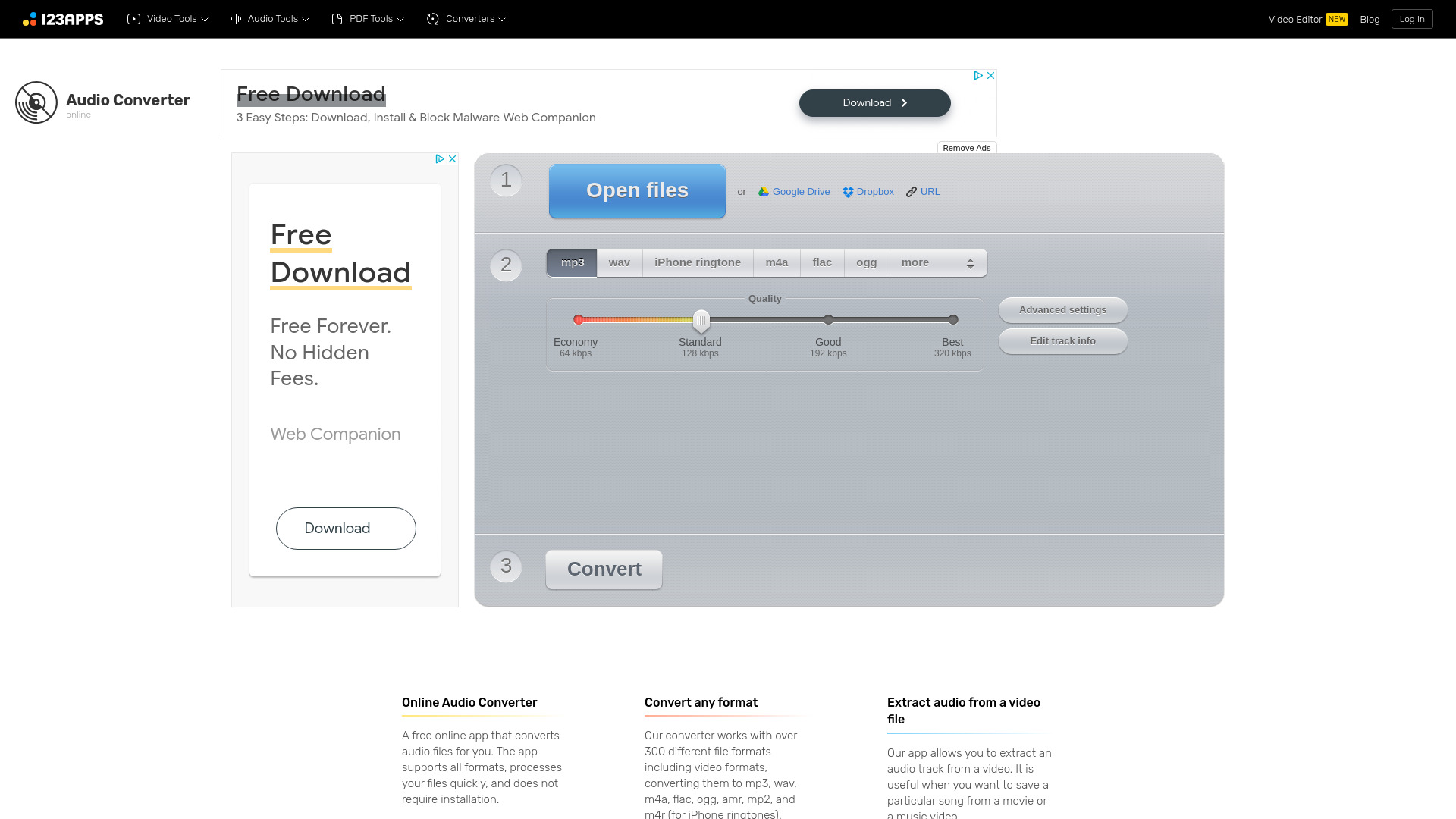
Online Audio Converter is a free, browser-based audio file conversion service developed by 123apps. It lets users upload audio or video files and convert them into common audio formats such as MP3, WAV, M4A, FLAC, OGG, AMR, MP2, and M4R iPhone ringtones. Because it runs entirely in a browser, no software download or installation is required.
SpecificationsAI-estimated
Key Features of Online Audio Converter
Use Cases for Online Audio Converter
Convert songs to MP3
Make audio files playable on virtually any device by converting them to MP3 at your preferred bitrate.
Create iPhone ringtones
Use the M4R output option to turn a song or sound clip into an iPhone ringtone quickly.
Extract audio from video
Pull the soundtrack from a movie, music video, or other video file and save it as a standalone audio file.
Compress audio files
Lower the bitrate to reduce file size for email, uploads, or storage-constrained devices.
Produce lossless audio files
Convert tracks to FLAC or WAV for high-quality preservation, editing, or archival purposes.
Edit track metadata
Update title, artist, album, year, and genre tags before downloading to keep your music library organized.
Batch-convert entire collections
Convert multiple audio files at once and receive a ZIP archive for quick, convenient downloading.
How to use Online Audio Converter?
Add your audio file
Click "Open files" to upload from your device, or choose Google Drive, Dropbox, or URL to bring in audio from another source.
Choose the output format
Select your desired output format: MP3, WAV, iPhone ringtone, M4A, FLAC, OGG, AMR, or MP2.
Configure settings
Optionally adjust quality presets, bitrate, sample rate, channels, fade, reverse, voice removal, and edit track information such as title, artist, album, year, and genre.
Convert the file
Press the "Convert" button and wait for the conversion to finish.
Download or save the result
Download the converted file to your computer, or save it directly to Google Drive or Dropbox.
Pros & Cons of Online Audio Converter
Pros
- No software installation required — runs entirely in the browser
- Supports over 300 formats and can convert video to audio
- Granular control over bitrate, sample rate, channels, and effects
- Batch conversion with ZIP downloads and Google Drive/Dropbox integration
- Uploaded files are automatically deleted for privacy
Cons
- Free tier shows ads and imposes file-size limits; Premium is required for up to 10 GB uploads
- An internet connection is required — there is no fully offline desktop mode
- Files are automatically deleted from the servers after a few hours, so you must download your conversions promptly
Frequently Asked Questions
Is Online Audio Converter free?
Yes, the core conversion service is free to use. An optional Premium subscription removes ads, unlocks larger file sizes, unlimited files, and additional features like AI audio processing.
What output formats are supported?
You can convert files to MP3, WAV, M4A, FLAC, OGG, AMR, MP2, and M4R iPhone ringtones. The tool accepts more than 300 input formats, including video formats.
Can I extract audio from video files?
Yes. The app can extract the audio track from a video file, which is useful for saving a particular song from a movie or music video.
Are my uploaded audio files safe and private?
Your files are automatically deleted from the servers a few hours after you finish working with them. No one else has access to them. For extra privacy, the service does not keep your converted files permanently.
Can I convert multiple files at once?
Yes, batch conversion is supported. Multiple files can be converted at the same time and are packaged into a ZIP archive for easier downloading.
Can I edit audio metadata tags?
Yes. You can edit track name, artist, album, year, and genre. Tag support is available for MP3, OGG, FLAC, and WAV files.
What advanced audio settings are available?
Advanced settings include quality presets, bitrate, sample rate, channel count, fade in, fade out, reverse playback, and removing a voice from the audio track.
Does Online Audio Converter require installation?
No installation is needed. The app works in a web browser, so you can use it on any device with an internet connection.
Pricing Overview
View full pricing →Online Audio Converter offers a free plan with daily file and size limits, plus a Premium subscription with unlimited files, larger file sizes, and no ads.
Reviews & Ratings0.0
No reviews yet. Be the first to write one!
Top Alternatives & Similar Software
View all alternatives & similar software→

People also viewed




Related searches
Is this your tool?
Claim this page to update details, reply to user reviews, and drive more traffic to your product.
Claim this Product →
Tags
Keep up with Online Audio Converter alternatives
New alternatives, pricing changes and the week's biggest movers - one email every Tuesday.