


FindAlternative
Back to Home
MoGoFun: TikTok Voice Generator

MoGoFun: TikTok Voice Generator

Turn text into funny TikTok AI voices with thousands of styles across 20+ languages.
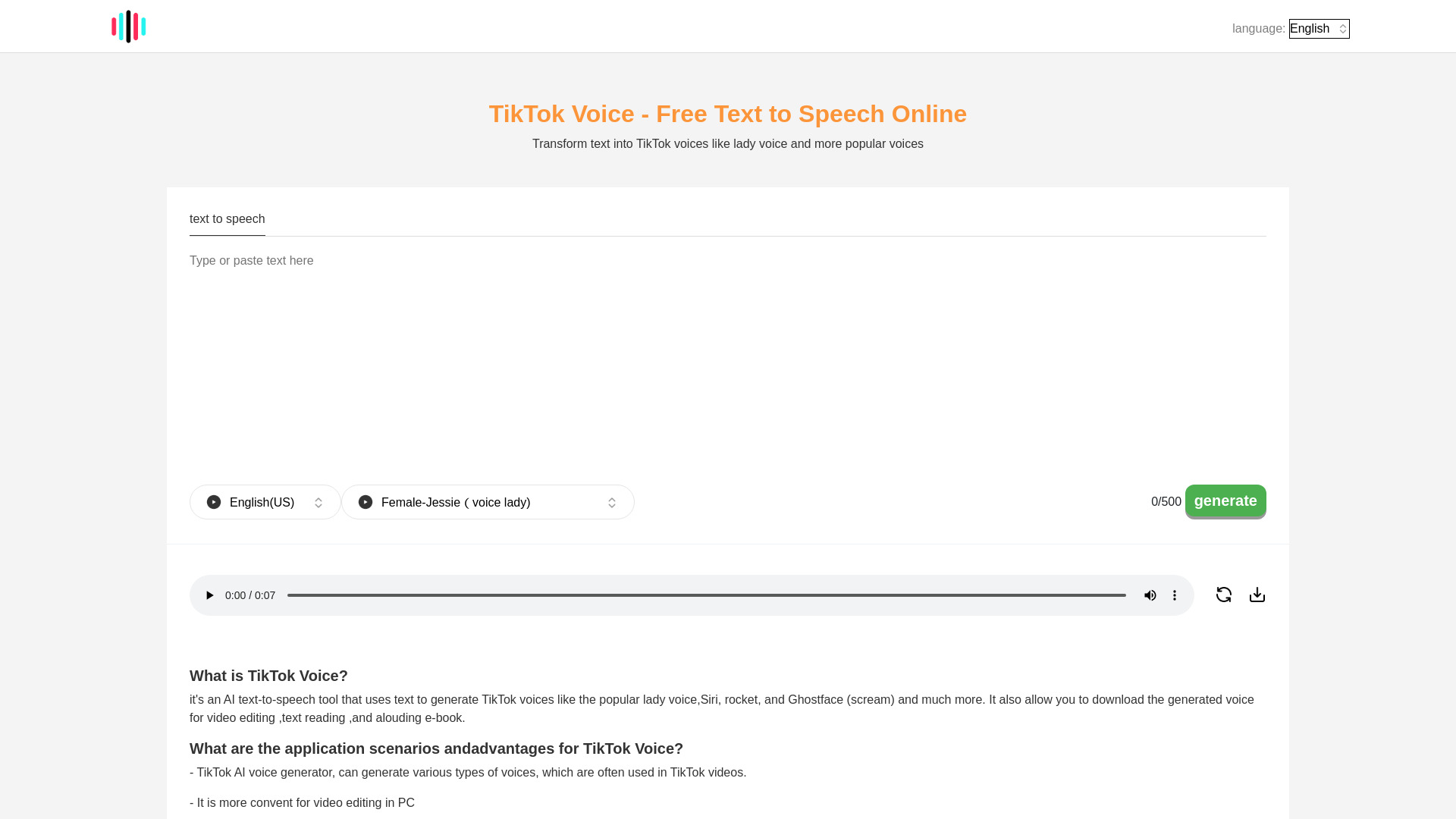
What is MoGoFun: TikTok Voice Generator?

MoGoFun is a free online TikTok voice generator that turns text into speech using AI text-to-speech technology. It offers a wide variety of voice styles across 20+ languages, including popular and funny voices such as Jessie, Ghostface, C3PO, Siri, Deadpool, and more. It is designed for TikTok creators, video editors, and content creators who want to add recognizable AI voiceovers to their videos.

SpecificationsAI-estimated

InputText (up to 500 characters)
OutputAI-generated audio file
PricingFree
PlatformWeb-based, PC-friendly
Languages20+ languages and accents
Voice stylesThousands of styles, including Jessie, Ghostface, C3PO, Siri, Deadpool, and more

Key Features of MoGoFun: TikTok Voice Generator

Generate funny TikTok AI voices from text
Supports popular character voices like Ghostface, C3PO, and Jessie
Simple 4-step process: choose language, choose voice, enter text, generate
Download generated audio for use in videos
Useful for adding voice effects not available in the TikTok app
Free text-to-speech generation

Use Cases for MoGoFun: TikTok Voice Generator

1

TikTok Video Dubbing

Create funny or dramatic voiceovers for TikTok videos using recognizable AI voices.

2

Meme and Comedy Content

Use iconic voices like Ghostface or C3PO to make humorous content.

3

Video Editing and Podcasts

Generate voiceovers for video edits, podcasts, and other content projects.

4

Replacing Removed TikTok Voice Effects

Access voice effects that may no longer be available in the TikTok app.

How to use MoGoFun: TikTok Voice Generator?

1

Choose language and accent

Select the desired language/accent from the first dropdown menu.

2

Select a voice

Pick a voice style such as Jessie, Ghostface, C3PO, or any other available voice.

3

Enter text

Type up to 500 characters of text into the text box.

4

Generate and download

Press the generate button, wait a few seconds, then play or download the audio file.

Pros & Cons of MoGoFun: TikTok Voice Generator

Pros

  • Free to use
  • Easy workflow: choose voice, type text, generate, download
  • Wide selection of voices, including iconic and funny characters
  • Generates human-like speech with latest TTS technology
  • Useful for creating voiceovers that may have been removed from the TikTok app
  • Works directly on PC, making video editing more convenient

Cons

  • Text input appears limited to 500 characters per generation
  • Generated audio must be manually transferred to a phone for TikTok uploads
  • Some voices like Jessie may feel overused depending on TikTok trends
  • Free service may have waiting times or limitations

Frequently Asked Questions

Is TikTok Voice Generator free?

Yes, it is a free text-to-speech tool.

Can it generate Jessie voice?

Yes. Select English (US), choose Jessie (Voice Lady), enter text, and generate.

Can it generate C3PO voice?

Yes. Select English (US), choose C3PO, enter text, and generate.

Can it generate Ghostface voice?

Yes. Select English (US), choose Ghostface, enter text, and generate.

Can it generate Siri voice?

Yes. Select English (US), choose Siri, enter text, and generate.

How do I add the generated voice to TikTok?

Transfer the audio file to your phone, upload your video in TikTok, use the 'add speech' feature to select the audio, then publish.

No reviews yet. Be the first to write one!

Top Alternatives & Similar Software

View all alternatives & similar software→
TTS Generator

TTS Generator

AI-suggested

TTS Generator is a free browser-based text-to-speech tool that turns written text into AI-generated spoken audio without requiring an account, payment, or API key. Users paste up to 5,000 characters (on desktop browsers) into the on-page editor, start the AI voice engine, select one of ten preset voice styles, adjust speed, and listen to the result instantly. The finished audio can be downloaded as MP3 for compact sharing or WAV for editing. Unlike many online TTS services, the actual speech generation and audio encoding happen in the user's own browser after the required engine and voice assets load. This means the entered text and generated audio are not sent to a remote speech-generation server, giving users a privacy-friendly option for scripts they prefer not to upload. Language availability depends on the browser: mobile browsers currently offer five languages, while most laptop and desktop browsers offer 31, including English, Spanish, French, German, Japanese, Korean, Arabic, and Vietnamese. TTS Generator is aimed at creators, educators, and general users who need quick narration or spoken versions of written content. It supports personal and commercial projects, as long as users disclose that audio is machine-generated and follow the applicable model-license restrictions. For more complex needs, the site links to optional Creator Tools for custom voices, videos, soundtracks, localization, and podcasts, but those are separate services with their own terms.

FineVoice

FineVoice

AI-suggested

FineVoice is a free, all-in-one AI voice generator that runs in the browser. It combines text-to-speech, voice cloning, voice transformation, speech-to-text, sound effect generation, and podcast creation tools into a single platform. The service emphasizes instant creation with no sign-up required, making it easy for anyone to produce studio-quality audio for videos, podcasts, audiobooks, e-learning content, advertisements, and more. The platform offers access to more than 1,500 realistic AI voices across 154 languages and accents. Users can fine-tune emotion, speaking style, speed, pitch, and intensity to create expressive and natural narration. FineVoice also lets users clone a voice in about 30 seconds, design a custom signature voice from text prompts, change a voice's pitch or gender, and generate royalty-free sound effects from text or video input. Speech-to-text tools support editing and export in TXT, JSON, SRT, and VTT formats. FineVoice is aimed at creators, educators, developers, and enterprises. Creators can produce YouTube voiceovers, ad narration, character voices, and multilingual content. Educators can turn course scripts into voiceovers, support global classrooms, and make materials more accessible. Developers can integrate scalable AI voice APIs for text-to-speech, voice cloning, and voice transformation into applications and workflows, with features such as encrypted connections and zero-retention options.

People also viewed

Related searches

About the Product

Unclaimed Listing
Platforms
Target AudienceTikTok creators, video editors, podcasters, meme makers, and content creators who want quick AI voiceovers.

Is this your tool?

Claim this page to update details, reply to user reviews, and drive more traffic to your product.

Claim this Product →

Show you’re listed

MoGoFun: TikTok Voice Generator on FindAlternative

Add this badge to your website. It links back to this page.

Get your badge →

Tags

TikTok voice generatortext-to-speechAI voice generatoraudio toolsvideo toolsvoiceover

Explore Related Topics

Keep up with MoGoFun: TikTok Voice Generator alternatives

New alternatives, pricing changes and the week's biggest movers - one email every Tuesday.

Weekly, free, unsubscribe in one click.

