



Solhun CLI Manager
Manage all your CLI agents in one place with a dedicated macOS desktop app.

What is Solhun CLI Manager?
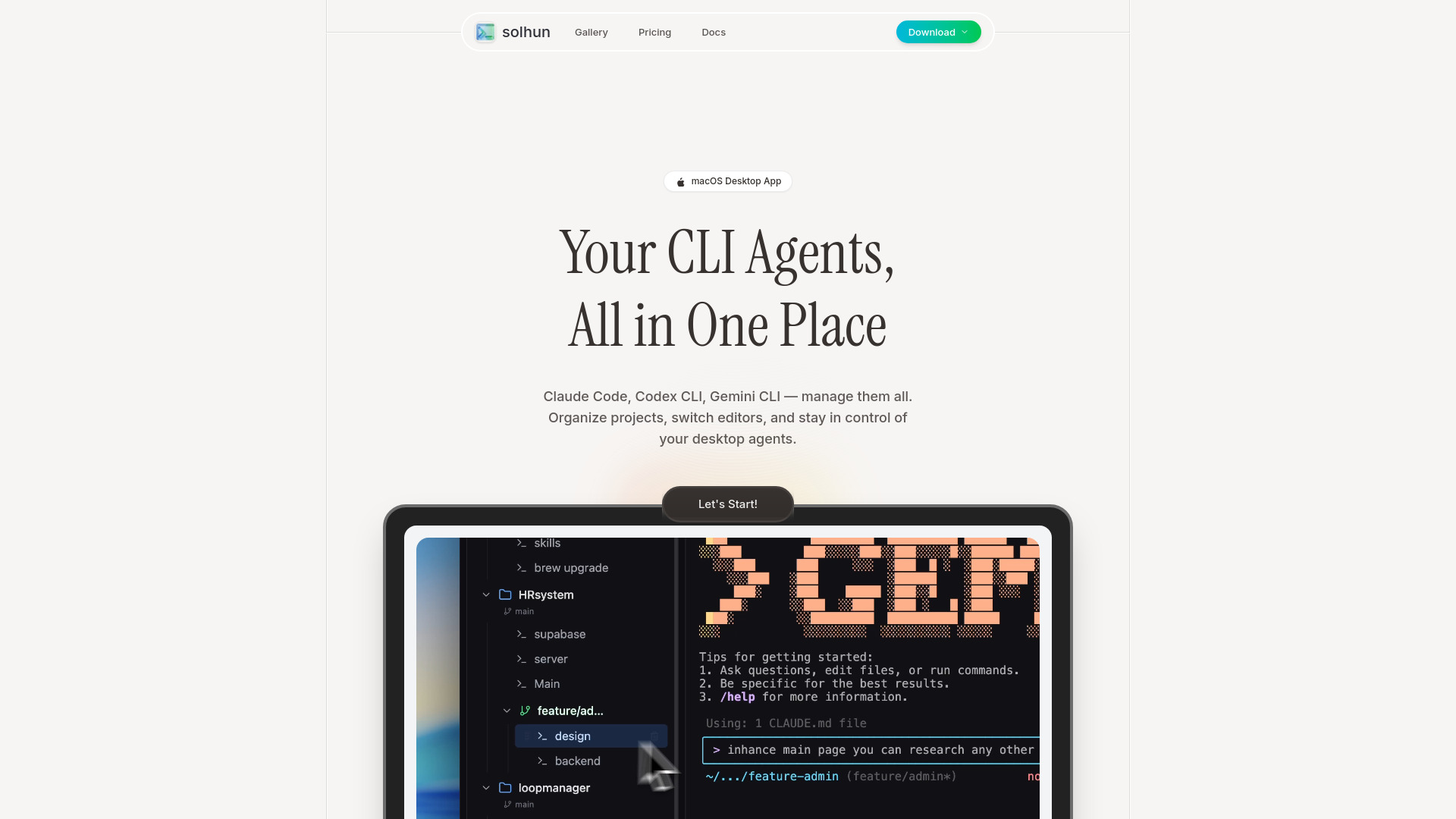
Solhun is a macOS desktop application designed to centralize and organize multiple CLI agents, including popular tools like Claude Code, Codex CLI, and Gemini CLI, into a single, unified workspace. The app provides a dashboard where users can view, manage, and switch between different agents without the need to juggle multiple terminal windows, promising a more streamlined and context-aware development workflow. This makes it easier for developers to maintain organization across all their AI-powered coding tools. Beyond basic management, Solhun allows for deep customization. Users can rename their agents with descriptive nicknames or roles, such as "Frontend Dev" or "Design Review," making it easier to identify and coordinate complex multi-agent workflows. The application also enables seamless editor switching, allowing users to jump between popular code editors like Cursor and VS Code with a single click. Solhun is built for developers who work with multiple AI agents and projects and want to consolidate their tooling. The app emphasizes local data processing for privacy and security, and it is designed to be vendor-neutral, meaning it doesn't lock users into a single AI ecosystem. By managing projects, ports, and workflows in one place, Solhun aims to improve efficiency and reduce the friction in a developer's daily routine.
SpecificationsAI-estimated
Key Features of Solhun CLI Manager
Use Cases for Solhun CLI Manager
Multi-Agent Development
Run multiple frontend and backend AI agents simultaneously, keeping their functions clear and organized with custom names and roles.
Context Switching
Switch between coding projects without losing track of which agent is associated with which task or codebase.
Organize by Stack
Use Solhun to organize agents working with different tech stacks, like design, backend, and frontend.
Project Management
Track and manage Git worktrees and ports across different projects from a single interface.
Environment Configuration
Set up terminal templates to launch complex workflows for different development environments or tasks.
Experimentation with AI Agents
Utilize different AI agents for experimentation without dealing with the hassle of breaking existing workflows.
How to use Solhun CLI Manager?
Download and Install
Install and launch Solhun on your Mac.
Add Your Agents
Find and add your existing CLI agents like Claude Code or Codex CLI to the dashboard.
Organize Agents
Assign nicknames and roles to your agents to easily identify their function in your workflow.
Manage Projects
Manage your projects by assigning agents to them and switching between different development contexts.
Switch and Manage
Configure your preferred code editor and switch between agents and projects with a single click as you work.
Pros & Cons of Solhun CLI Manager
Pros
- Manages multiple leading AI coding agents (including Claude, Codex, and Gemini)
- Intuitive organization with nicknames and roles for agents
- No vendor lock-in for AI tools
- Emphasizes privacy with 100% local processing
- Free core features
- Designed to reduce context switching
Cons
- Limited to macOS; no Windows support yet and Linux not on the roadmap
- No ecosystem for third-party extensions or plugins
- Dependent on third-party CLI agents that must be installed separately
Frequently Asked Questions
What is Solhun?
Solhun is a manager app that lets you manage multiple CLI agents (Claude Code, Gemini CLI, Codex, etc.) and projects all in one place.
What CLI tools does Solhun support?
You can add any CLI tool like Claude Code, Gemini CLI, Codex, and even apps. Switch freely between them with no vendor lock-in.
Is Solhun free to use?
Yes, core features are available for free.
Does Solhun support Windows or Linux?
Currently, only Mac is supported. Windows is coming soon. Linux is not yet on the roadmap.
Is my data safe with Solhun? What about privacy?
Solhun doesn't send any data externally. Everything is processed locally, and it's Apple notarized for your security.
What are some advanced features Solhun offers?
You can manage Git worktrees effortlessly, track ports across projects, and launch complex workflows with terminal templates.
Reviews & Ratings0.0
No reviews yet. Be the first to write one!
Top Alternatives & Similar Software
View all alternatives & similar software→


People also viewed



Related searches
Is this your tool?
Claim this page to update details, reply to user reviews, and drive more traffic to your product.
Claim this Product →
Tags
Keep up with Solhun CLI Manager alternatives
New alternatives, pricing changes and the week's biggest movers - one email every Tuesday.