




OpenHardwareMonitor
Free Windows tool to monitor CPU, GPU temps, fan speeds and voltages
Alternatives

Choose Fan Control if…
- Choose Fan Control if you need to blend CPU, GPU and
- Choose Fan Control if you want the fan logic to start at
- Choose Fan Control if you switch between quiet and
- Choose Fan Control if you rely on community plugins to
Choose SpeedFan if…
- you want to auto‑adjust fan speeds from temperature
- you need real‑time voltage and SMART health readouts
- you prefer a single free tool for both monitoring and
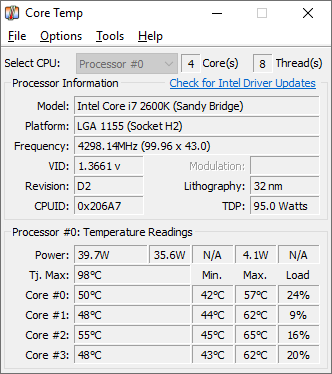
Choose Core Temp if…
- you need only per‑core CPU temperature readings
- you want the smallest possible monitoring footprint
- you rely on a battery‑status indicator for laptop use
- you plan to extend functionality with community plugins
Choose HWiNFO if…
- you need exhaustive hardware identification beyond basic
- you want on‑screen sensor overlays for gaming or streaming
- you require built‑in CPU and memory benchmark tools
How to Decide
OpenHardwareMonitor is a free, open‑source Windows utility that displays real‑time CPU, GPU, fan and voltage data and is popular among PC enthusiasts and IT administrators. The alternatives split into a few clear camps: Fan Control leans into granular custom fan curves via a Windows service and community plugin ecosystem; SpeedFan offers deep low‑level SMBus sensor access and voltage monitoring alongside fan speed control; HWiNFO provides an API and extensive third‑party integrations such as RTSS for advanced monitoring setups; Core Temp focuses on ultra‑lightweight per‑core CPU temperature readouts with a plugin platform for added functionality.
When choosing a replacement, look at the breadth of hardware sensor coverage (some tools monitor only CPU cores while others include GPU, power and storage sensors), the granularity of fan control (from simple thresholds to full custom curves), API or integration support for external dashboards or scripts, the application’s resource footprint (lightweight utilities versus feature‑rich suites), and the licensing model (open‑source versus proprietary free tools).
All Alternatives
“Focuses on building custom fan curves from sensor data, directly overlapping fan‑control functionality.”
“Same Windows hardware‑monitoring focus, reads temps, voltages and fan speeds, free like OpenHardwareMonitor.”
“Specializes in real‑time CPU temperature monitoring, a core use‑case of OpenHardwareMonitor.”
“Provides comprehensive sensor readouts (temps, voltages, fan speeds) on Windows and is free.”
About the Product
Is this your tool?
Claim this page to update details, reply to user reviews, and drive more traffic to your product.
Claim this Product →