




Image Editor Online
Free AI Image Editor Online: Edit Photo with Text, No Sign-Up
What is Image Editor Online?
Free AI-powered online image editor that allows users to edit, crop, and enhance photos using natural language prompts. Offers multiple AI models (Nano Banana, Flux Kontext, Seedream, GPT), hundreds of preset prompts and styles, continuous editing workflow, high-resolution free downloads, and supports various use cases like social media content, posters, and educational materials — all without sign-up or watermark.
SpecificationsAI-estimated
Key Features of Image Editor Online
Use Cases for Image Editor Online
Photo Optimization
Bloggers and content creators can quickly enhance photos, adjust colors, and apply filters directly in the browser.
Social Media Content Creation
Generate banners, social media posts, and promotional graphics with preset prompts.
Poster and Educational Design
Design posters and visually appealing learning materials using AI-powered tools.
E-commerce Product Photography
Remove backgrounds and enhance product details for e-commerce websites.
How to use Image Editor Online?
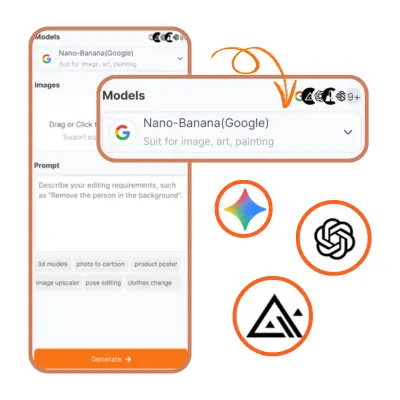
Choose an AI Model
Select the AI model that best fits your editing needs. Each model has unique strengths, allowing you to optimize photos, apply creative effects, or handle specific tasks efficiently.
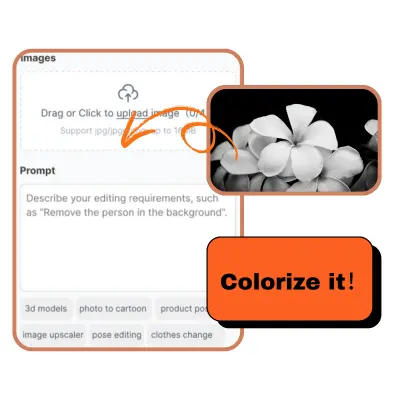
Upload Image and Apply Prompt
Upload the photo you want to edit, then either pick a preset prompt or type a description of your desired changes. The AI will understand your instructions and prepare the image for processing.
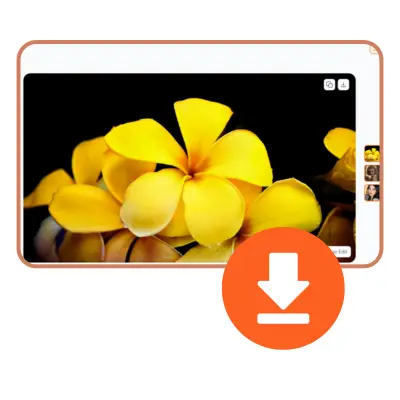
Generate and Download
Wait a few seconds to a minute while the AI processes your image. Once completed, preview the result and download your high-quality edited photo instantly.
Pros & Cons of Image Editor Online
Pros
- Free to use with no watermark
- No sign-up required for basic editing
- Easy to use with natural language prompts
- Multiple AI models to choose from for better results
- Hundreds of preset prompts save time
- Supports continuous editing without switching tools
- High-resolution downloads at no cost
- Accessible on any device with a web browser
Cons
- AI model outputs may vary in accuracy depending on prompt complexity
- Requires internet connection for all AI processing
- Limited advanced manual editing tools compared to desktop software
- Preset prompts may not cover highly specific or niche editing needs
- Privacy concerns for uploading sensitive images to cloud AI
- Potential queue times during high traffic periods
Frequently Asked Questions
Do I need to sign up to use Image Editor Online?
No, you can upload and edit images without creating an account or signing up.
Is there a watermark on downloaded images?
Yes, you can download edited images in high resolution for free, and no watermark is added.
How long does AI processing take?
The processing time typically ranges from a few seconds to a minute, depending on the complexity of the edit and the AI model selected.
Can I choose different AI models for editing?
Yes, the platform offers multiple AI models like Nano Banana, Flux Kontext, Seedream, and GPT, each optimized for different editing tasks.
Are there preset prompts for users who are not familiar with writing prompts?
Yes, there are hundreds of pre-designed prompts and styles available for one-click application, which is helpful for users who are new to prompt writing.
What are the typical use cases for this editor?
The tool supports scenarios such as photo optimization, social media content creation, posters, learning materials, e-commerce product images, and more.
Is Image Editor Online available on mobile devices?
Image Editor Online is accessible in web browsers and requires an internet connection to process images via AI models.
Reviews & Ratings0.0
No reviews yet. Be the first to write one!
Top Alternatives & Similar Software
View all alternatives & similar software→

People also viewed

Related searches
About the Product
Is this your tool?
Claim this page to update details, reply to user reviews, and drive more traffic to your product.
Claim this Product →
Tags
Explore Related Topics
Keep up with Image Editor Online alternatives
New alternatives, pricing changes and the week's biggest movers - one email every Tuesday.