



HitPaw vs Text2Video-Zero
Side-by-side comparison of features, pricing, ratings, and alternatives.

HitPaw is an AI-powered media enhancement suite that helps creators turn low-quality video, photos, and audio into polished, high-resolution content. It combines video upscaling, photo restoration, format conversion, real-time voice changing, and language localization in one ecosystem. The tools are designed for everyone from photographers and YouTubers to e-commerce sellers and small business owners who need fast, reliable media editing without a steep learning curve. The suite includes dedicated modules for different tasks. HitPaw FotorPea focuses on image enhancement, using AI to sharpen blurry pictures, remove noise, upscale low-resolution files, and restore old or damaged photos. HitPaw VikPea handles video enhancement, with features for denoising, facial enhancement, SDR-to-HDR conversion, watermark removal, and background elimination. HitPaw Univd acts as a universal converter that can process video, audio, and images at speeds up to 170 times faster while preserving quality. There is also a real-time AI voice changer with more than 200 character voices and low-latency performance for live streaming. HitPaw is used by more than 7.3 million people in over 190 countries, with a 4.7 Trustpilot rating and a 98% satisfaction rate. It is especially popular among YouTubers, photographers, filmmakers, online sellers, and marketers who need to prepare high-definition content quickly and at scale. The platform's AI automation reduces manual editing time dramatically, and its translation, subtitling, and voice-dubbing features help global creators break language barriers.
Text2Video-Zero is a software that leverages text-to-image diffusion models to generate videos from text prompts. This technology enables zero-shot video generation, meaning it can produce videos without requiring any prior training data. The software is based on research presented at ICCV 2023 and is available on GitHub.
- All-in-one AI suite for video, photo, audio, and format conversion.
- Dramatically speeds up restoration and enhancement tasks, cutting manual work from weeks to hours.
- High user trust with 4.7 Trustpilot rating and 7.3M+ users worldwide.
- Real-time voice changer with 200+ voices and under 0.3s latency for live streaming.
- Zero-shot video generation capability
- AI-powered technology for video creation
- Open-source software for community collaboration
- Research-oriented and based on ICCV 2023 presentation
- Full pricing and free-tier details are not disclosed on the landing page.
- The reviewed page focuses on desktop-style workflows and does not mention a mobile app.
- As a proprietary product, it is not open source and offers limited customizability.
- Heavy AI enhancement tasks may require a reasonably powerful computer for the fastest results.
- Limited user interface and user experience
- Requires technical expertise for usage and customization
- Limited support options available
More alternatives & similar tools
Alternatives to HitPaw
View all →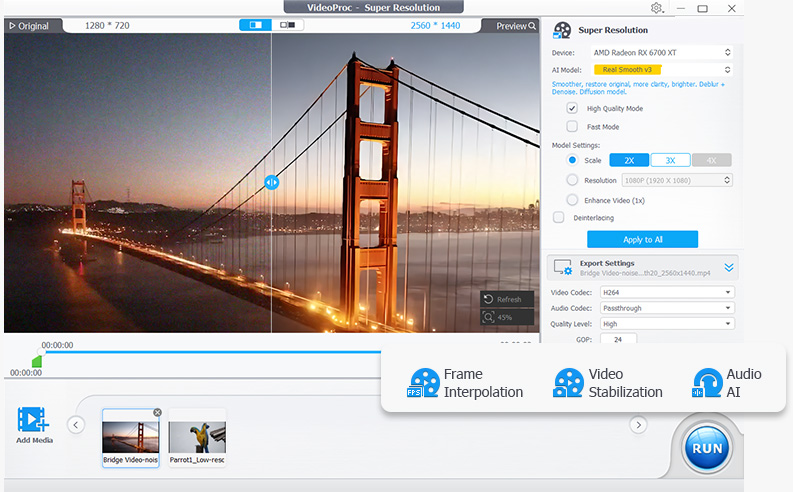

Long-running video conversion tool supporting 1000+ formats with AI upscaling and compression.
Alternatives to Text2Video-Zero
View all →


The Verdict
AI-generated from listing dataText2Video-Zero is a free, open‑source tool for researchers who can code and need zero‑shot text‑to‑video generation; HitPaw is a proprietary, UI‑driven suite for creators who want AI‑enhanced video, photo, and audio editing without programming.
Key differences
- •Video creation vs. media enhancement: Text2Video-Zero generates videos from text; HitPaw improves existing media.
- •Cost: Text2Video-Zero is free; HitPaw pricing is not disclosed.
- •Technical barrier: Text2Video-Zero requires coding and self‑hosting; HitPaw offers a ready‑made desktop interface.
- •Open‑source vs. proprietary: Text2Video-Zero is open source with community support; HitPaw is closed source with limited customizability.
Pricing & value
Text2Video-Zero is free, while HitPaw’s pricing is unknown and likely paid.
Ease of use / learning curve
HitPaw provides a desktop UI for non‑technical users; Text2Video-Zero needs technical expertise and self‑hosting.
Features & depth
HitPaw covers video upscaling, photo restoration, audio cleaning, voice changing, translation, etc.; Text2Video-Zero focuses solely on zero‑shot video generation.
Integrations & ecosystem
Text2Video-Zero offers an API and is open source on GitHub; HitPaw’s integration details are not provided.
Collaboration
Open‑source community (GitHub issues, stars) enables collaboration; HitPaw is a closed product with no collaboration features mentioned.
Scalability
Self‑hosted deployment lets users scale resources as needed; HitPaw appears to be a desktop app with limited scalability.
Support
Text2Video-Zero offers GitHub Issues; HitPaw’s support options are not specified, making a clear winner impossible.
Choose HitPaw if…
Content creators seeking an easy‑to‑use AI suite for video/photo/audio enhancement and conversion.
Choose Text2Video-Zero if…
Researchers or developers comfortable with Python who need zero‑shot text‑to‑video generation.
Common questions
What is the cost to start using each tool?
Text2Video-Zero is free; HitPaw’s pricing is not disclosed on the landing page.
Do I need programming skills to use them?
Text2Video-Zero requires technical expertise and self‑hosting; HitPaw provides a ready‑made desktop interface for non‑technical users.
Can I customize or extend the software?
Text2Video-Zero is open source on GitHub, allowing code modifications; HitPaw is proprietary with limited customizability.